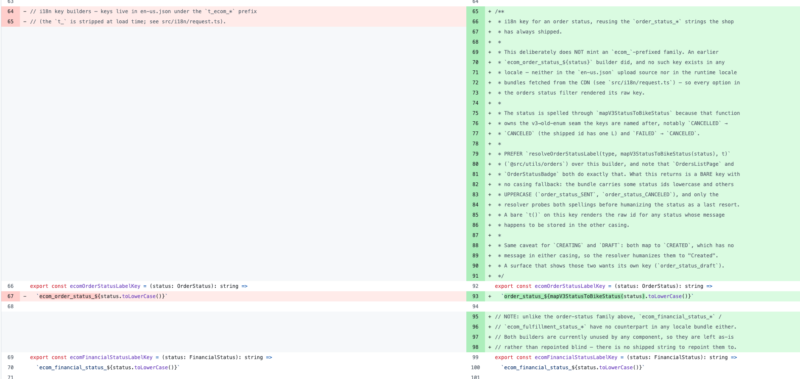
Just a short one – since the recent release of Opus 5 I noticed that all of my sloperation seem to have even more comments in the code now than ever.
On one hand is kind of good for future generations [of agents] to figure out this or that thing, but it seems to be very excessive and deliberate.
My theory is that the model is incentivized to do that by either claude code itself or it’s baked in the model weights to produce more output tokens. I don’t have other good explanation for this where the task was to just swap some translation strings:
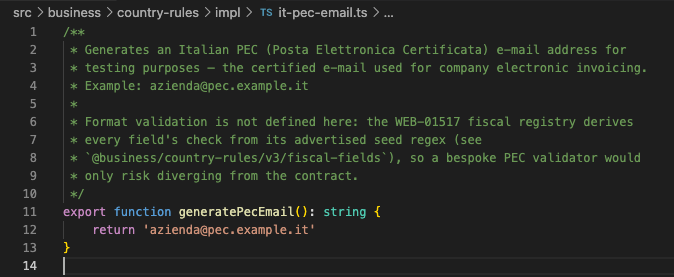
Also my colleague shared this recent snippet of his work:
During the development of my Sourdough sensor project, I managed to flash some bad firmware to my devboard.
The code didn’t crash, but it went into a deep sleep after just three seconds. Because of that, the serial port wouldn’t stay active long enough for me to flash a newer firmware version.
It wasn’t a fatal issue, but it was going to be a hassle to fix—and not what I wanted to deal with during an evening hobby session. So, I just picked up another Wemos D1 mini I had lying around, flashed it, and moved on.
Fast forward to today.
I got back to the project because I needed a second devboard to test my home-brewed OTA system.
I remembered the semi-bricked board and, without expecting much, asked an LLM to write a quick script to watch the specific /dev/... port and attempt to flash a basic Arduino LED blink code the moment the board responded.
It worked on the second attempt. I didn’t even have to adjust the prompting, check the firmware code, or look up flasher arguments.
By the time I finished typing this post, it had also completed flashing the actual OTA firmware I wanted to test.
Thought I should share this. I’ve done some development on a pet project using prisma and MySQL.
I added a new model with a relation and was getting an error prisma foreign key error constraint failed on applicationId P2003 when trying to create this new model even though the code and schema looked ok.
The fix was to rename the reference field to a lower case, so it’s different from the actual model name. Probably trivial for someone, but I haven’t any explicit notes against it in the docs.
model Invoices {
  id            Int             @id @default(autoincrement())
  ...
  // works:
  application   Application     @relation(fields: [applicationId], references: [id], onDelete: NoAction, onUpdate: Cascade)

  // does not wrk:
  Application   Application     @relation(fields: [applicationId], references: [id], onDelete: NoAction, onUpdate: Cascade)

  applicationId Int
}
It’s been a while since the last time I’ve posted anything here.
Full-scale war was launched by russia in Ukraine. The life was kind of quirky these months.
Anyway, the company I work for, managed to continue the business, almost without changes. Some part of the team has moved out of Ukraine, but otherwise our work rhythm is back to what it was before.
Found some interesting things I wanted to share:
Simple JSON to TypeScript Converter We are in the process of migrating to TypeScript, so this is quite handy.
You put in a bunch of JSON of your data, and get a typed interface(s) as a result: http://json2ts.com/
Simple notification system / bot for github/gitlab (and some other services) – https://danger.systems/
One of my most fun interviews was with DI.FM in 2018.
On the coding lab I was asked to make a tic-tac-toe game in one hour. I was later given some time to refine it afterwards, but the core thing was done in time and it was interesting.
Here is my new small project – TableStatus/StenGazeta (Daybook.buznik.family as of November 2020).
I have been thinking about creating some kind of a status screen for my home and family for a long time.
Our friends have recently donated an old iPad 2 to us. It runs iOS 9.3.5, so I can barely install a handful of apps from Appstore. That’s where this idea started.
I could never gather all the details until this Christmas, when I got some time and slapped together a preact web app.
Demo
Features
It’s a web page that displays widgets:
daily weather – temperature, conditions and humidity, and lunar phase
agenda – events from our shared calendar for the day (events are also togglable, so you can use it as wishlist)
photoslider with pictures from selected google photos albums
simple notes
Nothing particularly interesting about those – mostly leveraging a couple of APIs. I used openweathermap.org for weather, and Google APIs to retrieve the calendar and photos.
The notes are just a text area that stores value in localStorage, not synced across sessions.
Usage
You can just visit Daybook page on your iPad and it will work.
In order for Calendars and Photos to work, you need to login with your Google account.
Source and Setting Up
Right now, I’m happy with the result, though I’m adding some ideas as enchancements on Github.
It has a readme which has some notes on the API keys that you need to get and some other vars to set up.
The project is build with webpack and can be hosted on any kind of hosting. I use Netlify for it.
You can set up one for youself, too.
Anyway, let me know if you’d like to use it, but it lacks something via this form.
A note to React gurus and beginners
The project is definitely not to show off my React skills, rather the opposite – I wanted to slap some stuff together in a very limited timeframe and also to try preact.
Also if you are a beginner and want to learn by its code – it’s not the best specimen.
preact
I wanted to go really minimal and was lured by preact’s promise of 3kb gzipped size.
However I ended using the preact CLI to create the project boilerplate together will the webpack and compilers and other stuff, and 260Mb node_modules.
Also tried to start with React Native, but its toolchain is still not clear to me. Ran into a couple of issues with the suggested solutions as “reinstall all your node_modules and cocoa pods”, not cool.
This is a desktop player for DI.FM that I made for the 20-year anniversary.
I gathered a lof of experience during this proejct:
learned how to solder (again)
familliarised myself with Python
wrote and debugged firmware for an Arduino Nano
learned to model in Fusion 360
found out that 3-d printing don’t happen right on the first time
Details
Desktop player based on Raspberry Pi, that can play DI.FM channels (IceCast streams to be exact).
It is controlled with photoslides frames that have NFC-stickers on them, the stickers point to certain channels.
The player can also play other sources like Spotify, Google Play Music, Soma.fm thanks to MusicBox software.
It has a physical Play/Pause button, volume knob and a small screen that displays current track. Sound output is through audiojack or HDMI (Raspberry Pi standard).